> ## Documentation Index
> Fetch the complete documentation index at: https://docs.unibee.dev/llms.txt
> Use this file to discover all available pages before exploring further.
# How To Create A UniBee Billable Metric
\#How To Create A UniBee Billable Metric
## 1. Overview
The **Billing Metric** module allows you to define and track billable business metrics such as API requests, storage usage, or AI token consumption.\
The redesigned interface introduces **template-based configuration**, **real-time previews**, and **clear contextual guidance** to make metric setup faster and more intuitive.
### 🎯 Key Benefits
* **Lower learning curve** – friendly field names and contextual explanations
* **Faster onboarding** – quick-start templates for common billing use cases
* **Instant validation** – live event and aggregation previews
* **Standardized model** – consistent flow: *Event → Metric → Aggregation → Billing*
 ***
## 2. Navigation
Access this module from the sidebar:
> **Product → Billable Metric**
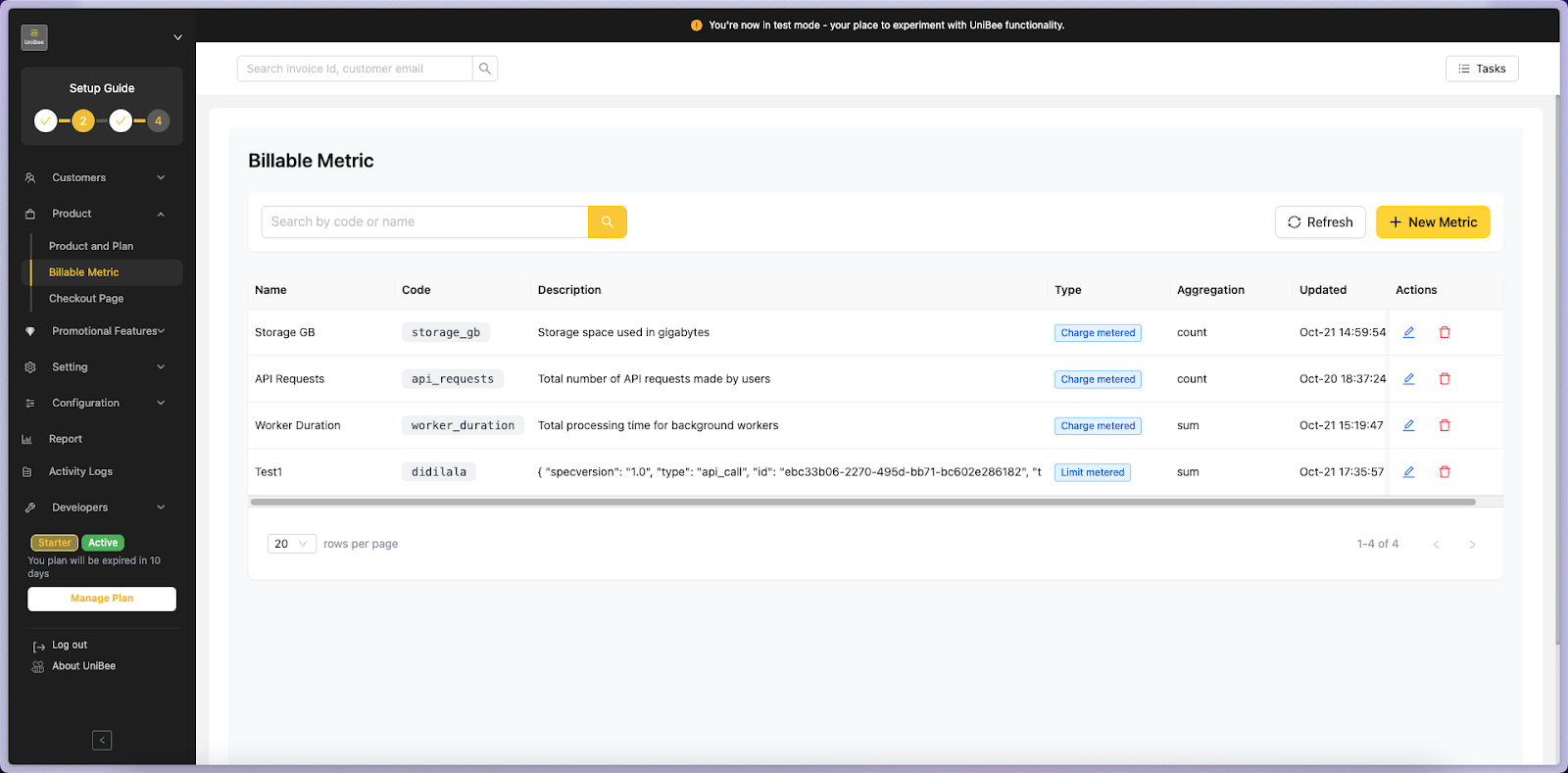
The main list view displays all existing metrics, including:
* **Metric Name & Code**
* **Aggregation Type** (Count / Sum / Max / Unique)
* **Charge Type** (Charge Metered / Charge Recurring)
* **Last Updated**
* **Actions** (✏️ Edit / 🗑 Delete)
***
## 2. Navigation
Access this module from the sidebar:
> **Product → Billable Metric**
The main list view displays all existing metrics, including:
* **Metric Name & Code**
* **Aggregation Type** (Count / Sum / Max / Unique)
* **Charge Type** (Charge Metered / Charge Recurring)
* **Last Updated**
* **Actions** (✏️ Edit / 🗑 Delete)
 ***
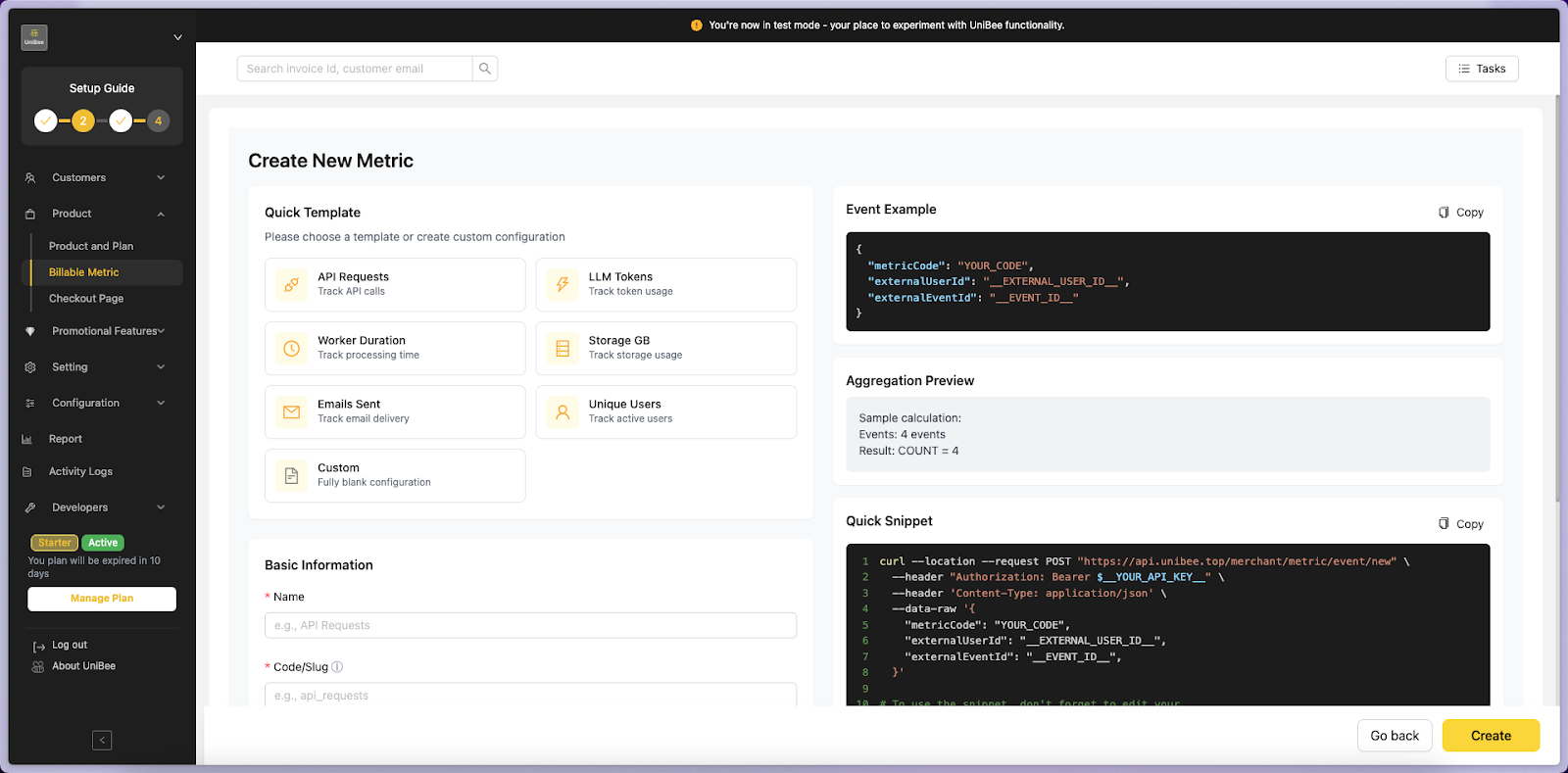
## 3. Create a New Metric
Click **“+ New Metric”** to open the metric creation page.
### 3.1 Quick Templates
Predefined templates are provided for common billing scenarios.\
Selecting a template will auto-fill key fields, but you can freely modify them.
| Template | Purpose | Aggregation | Unit |
| --------------- | ------------------------- | ----------- | -------- |
| API Requests | Track API calls | Count | requests |
| LLM Tokens | Track token usage | Sum | tokens |
| Worker Duration | Track task duration | Sum | ms |
| Storage GB | Track storage usage | Max | GB |
| Emails Sent | Track sent emails | Count | emails |
| Unique Users | Track active users | Unique | users |
| Custom | Fully blank configuration | any | custom |
***
## 3. Create a New Metric
Click **“+ New Metric”** to open the metric creation page.
### 3.1 Quick Templates
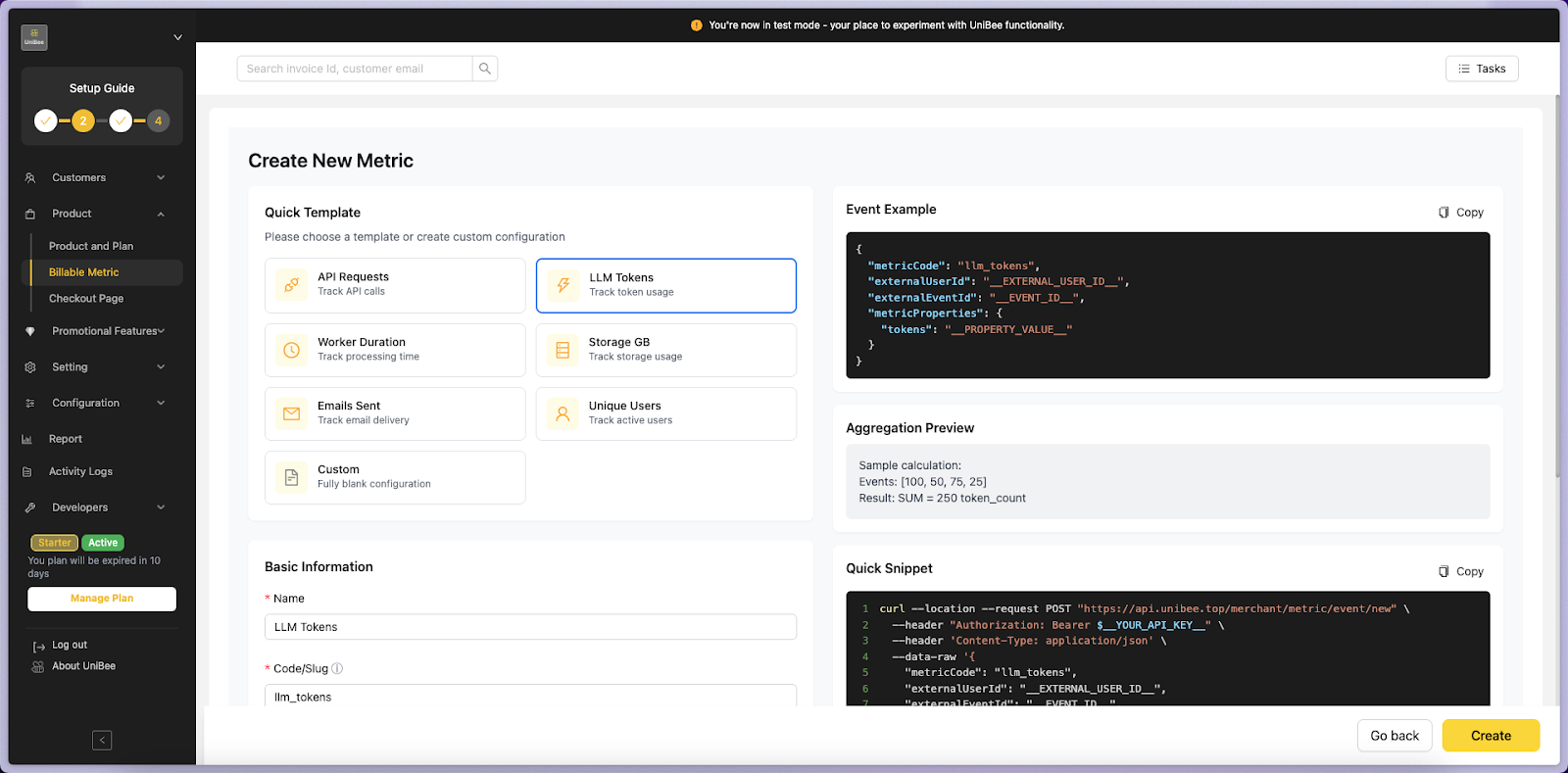
Predefined templates are provided for common billing scenarios.\
Selecting a template will auto-fill key fields, but you can freely modify them.
| Template | Purpose | Aggregation | Unit |
| --------------- | ------------------------- | ----------- | -------- |
| API Requests | Track API calls | Count | requests |
| LLM Tokens | Track token usage | Sum | tokens |
| Worker Duration | Track task duration | Sum | ms |
| Storage GB | Track storage usage | Max | GB |
| Emails Sent | Track sent emails | Count | emails |
| Unique Users | Track active users | Unique | users |
| Custom | Fully blank configuration | any | custom |
 ***
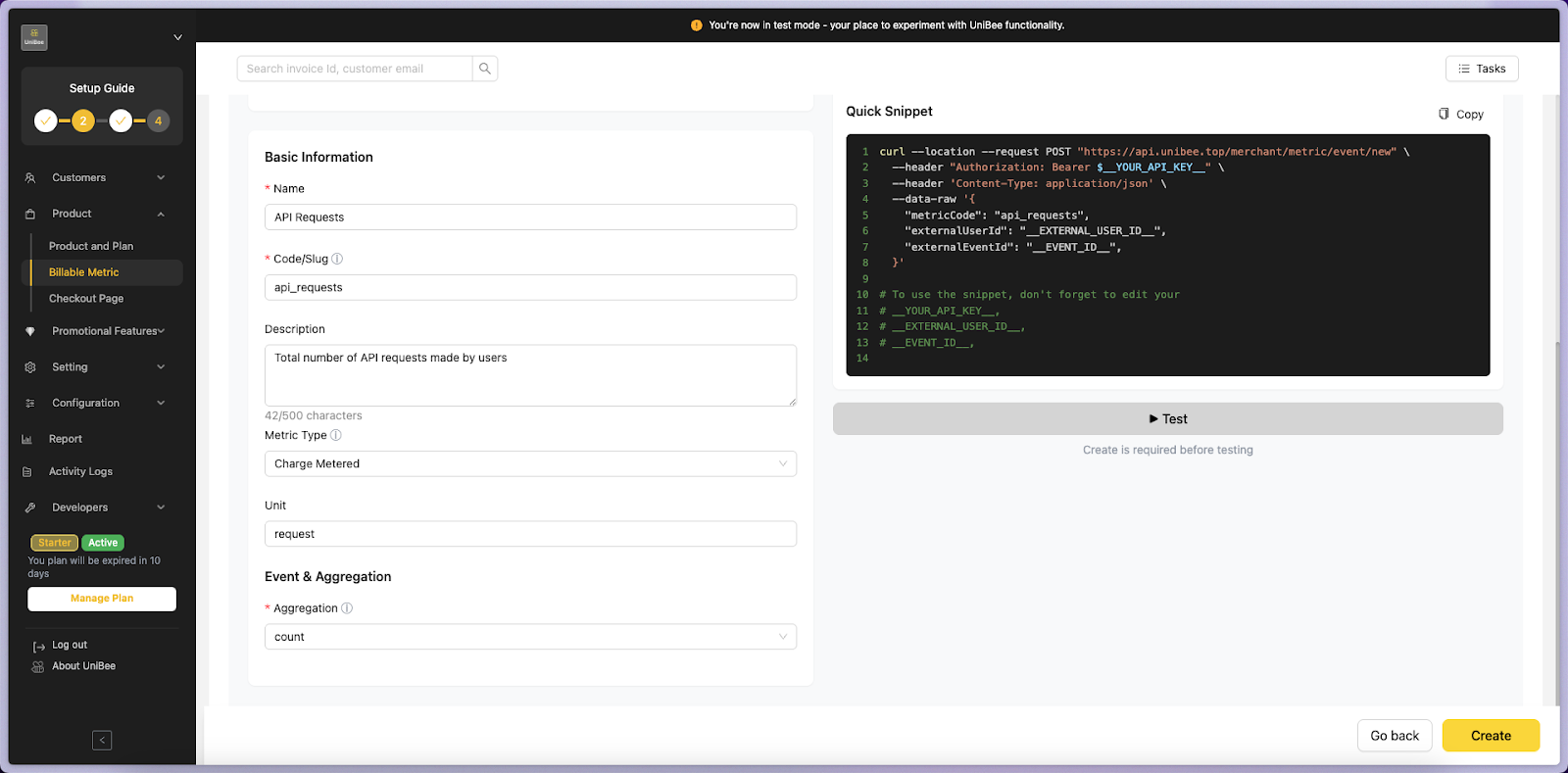
### 3.2 Basic Information
| Field | Description | Required |
| --------------- | ------------------------------------------------------ | -------- |
| **Name** | Human-readable name (e.g. API Requests) | ✅ |
| **Code / Slug** | Unique identifier generated from the name (editable) | ✅ |
| **Description** | Optional explanation of the metric purpose | |
| **Metric Type** | See [Metric Types Guide](#metric-type-selection) below | ✅ |
| **Unit** | Unit of measure (e.g. requests, tokens, GB, ms) | ✅ |
> 💡 The **Slug** auto-generates from the Name and must be unique.
***
### 3.2.1 Metric Type Selection
When creating a metric, you must choose one of **four metric types**. This choice determines how usage is tracked and billed:
#### Limit Metered
* **Behavior**: Usage resets completely at the start of each billing cycle
* **Quota**: Hard limit that rejects requests when exceeded
* **Carryover**: No - unused quota is lost
* **Best For**: Monthly allowances that reset (e.g., "1000 API calls per month")
**Example**:
```
Month 1: 1000 units, used 800 → 200 unused (lost)
Month 2: 1000 units (fresh start)
```
#### Limit Recurring ⭐
* **Behavior**: Usage resets, but unused quota carries over
* **Quota**: Soft limit with automatic carryover
* **Carryover**: Yes - unused quota is preserved
* **Best For**: Prepaid credits (e.g., "1000 SMS credits per month")
**Example**:
```
Month 1: 1000 units, used 700 → 300 unused (carries over)
Month 2: 1000 base + 300 carryover = 1300 units total
```
#### Charge Metered
* **Behavior**: Usage resets each cycle, charges based on consumption
* **Billing**: Additional charges added to invoice at period end
* **Reset**: Yes - usage resets to zero each period
* **Best For**: Pay-per-use services (e.g., "\$0.10 per API call")
**Example**:
```
Month 1: User makes 500 calls × $0.10 = $50 added to invoice
Month 2: Usage resets, new billing cycle starts
```
#### Charge Recurring
* **Behavior**: Usage accumulates continuously across periods
* **Billing**: Charges based on total accumulated usage
* **Reset**: No - usage never resets
* **Best For**: Cumulative usage billing (e.g., total data usage)
**Example**:
```
Month 1: 100 GB used
Month 2: +50 GB (total: 150 GB)
Month 3: +75 GB (total: 225 GB)
```
#### Quick Decision Guide
| Need | Recommended Type |
| ------------------------------------ | -------------------- |
| Monthly quota that resets completely | **Limit Metered** |
| Prepaid credits that accumulate | **Limit Recurring** |
| Pay-per-use billing | **Charge Metered** |
| Cumulative/lifetime usage | **Charge Recurring** |
> 💡 **Not sure which type to choose?** See the detailed comparison in [What is Billable Metric?](./what-is-billable-metric) for more examples.
***
### 3.3 Event & Aggregation
| Field | Description |
| ---------------------- | ---------------------------------------------------------------------- |
| **Aggregation** | Defines how data is summarized: Count / Sum / Max / Min / Unique Count |
| **Value Property** | Numeric field path, required for Sum/Max/Min types |
| **Distinct By** | Used for Unique Count (e.g. user\_id) |
| **Labels to Group By** | Split usage by dimensions (e.g. region, plan, customer\_id) |
#### Right-Side Preview Panel
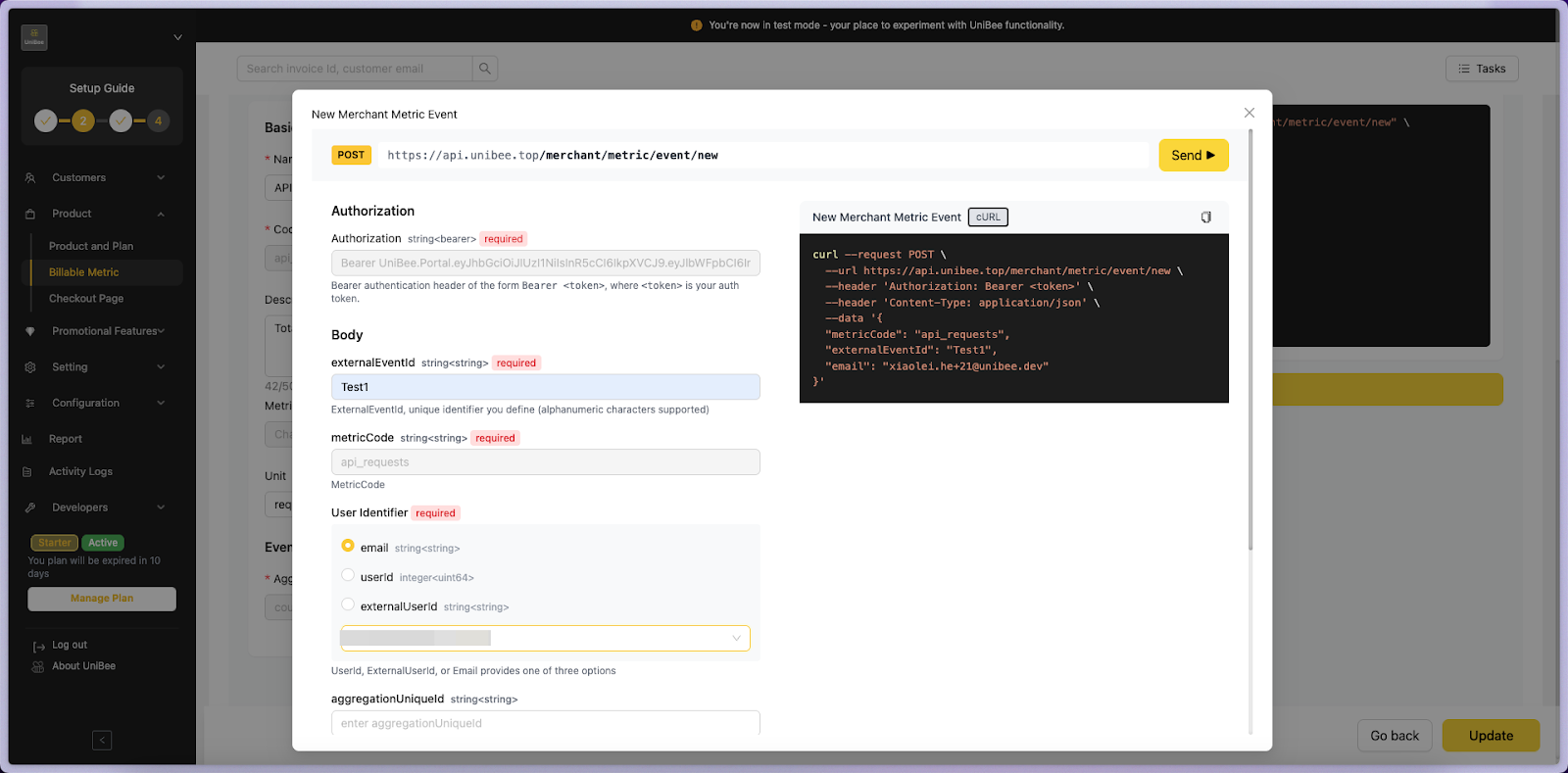
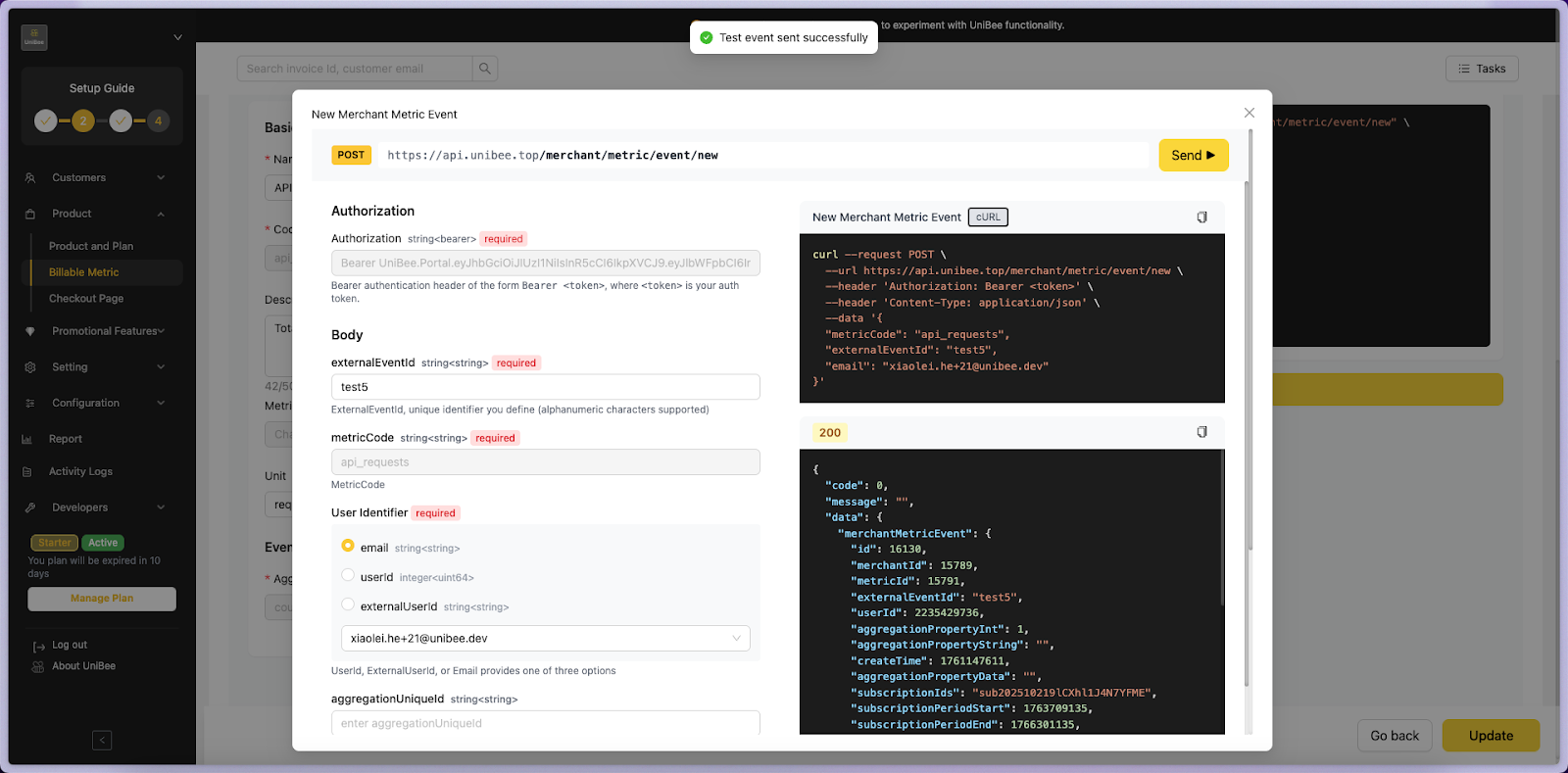
* **Event Example:** Live JSON event structure based on your form inputs
* **Aggregation Preview:** Displays example calculations (e.g. `1 + 2 + 3 = 6` or `max(10, 20, 30) = 30`)
* **Quick Snippet:** Auto-generated cURL / SDK example for developer use
* **Test It:** Simulate an event and preview real-time calculation results
> Highlight the right-side panels in color (Event Example – green, Aggregation Preview – blue, Quick Snippet – yellow).
***
### 3.2 Basic Information
| Field | Description | Required |
| --------------- | ------------------------------------------------------ | -------- |
| **Name** | Human-readable name (e.g. API Requests) | ✅ |
| **Code / Slug** | Unique identifier generated from the name (editable) | ✅ |
| **Description** | Optional explanation of the metric purpose | |
| **Metric Type** | See [Metric Types Guide](#metric-type-selection) below | ✅ |
| **Unit** | Unit of measure (e.g. requests, tokens, GB, ms) | ✅ |
> 💡 The **Slug** auto-generates from the Name and must be unique.
***
### 3.2.1 Metric Type Selection
When creating a metric, you must choose one of **four metric types**. This choice determines how usage is tracked and billed:
#### Limit Metered
* **Behavior**: Usage resets completely at the start of each billing cycle
* **Quota**: Hard limit that rejects requests when exceeded
* **Carryover**: No - unused quota is lost
* **Best For**: Monthly allowances that reset (e.g., "1000 API calls per month")
**Example**:
```
Month 1: 1000 units, used 800 → 200 unused (lost)
Month 2: 1000 units (fresh start)
```
#### Limit Recurring ⭐
* **Behavior**: Usage resets, but unused quota carries over
* **Quota**: Soft limit with automatic carryover
* **Carryover**: Yes - unused quota is preserved
* **Best For**: Prepaid credits (e.g., "1000 SMS credits per month")
**Example**:
```
Month 1: 1000 units, used 700 → 300 unused (carries over)
Month 2: 1000 base + 300 carryover = 1300 units total
```
#### Charge Metered
* **Behavior**: Usage resets each cycle, charges based on consumption
* **Billing**: Additional charges added to invoice at period end
* **Reset**: Yes - usage resets to zero each period
* **Best For**: Pay-per-use services (e.g., "\$0.10 per API call")
**Example**:
```
Month 1: User makes 500 calls × $0.10 = $50 added to invoice
Month 2: Usage resets, new billing cycle starts
```
#### Charge Recurring
* **Behavior**: Usage accumulates continuously across periods
* **Billing**: Charges based on total accumulated usage
* **Reset**: No - usage never resets
* **Best For**: Cumulative usage billing (e.g., total data usage)
**Example**:
```
Month 1: 100 GB used
Month 2: +50 GB (total: 150 GB)
Month 3: +75 GB (total: 225 GB)
```
#### Quick Decision Guide
| Need | Recommended Type |
| ------------------------------------ | -------------------- |
| Monthly quota that resets completely | **Limit Metered** |
| Prepaid credits that accumulate | **Limit Recurring** |
| Pay-per-use billing | **Charge Metered** |
| Cumulative/lifetime usage | **Charge Recurring** |
> 💡 **Not sure which type to choose?** See the detailed comparison in [What is Billable Metric?](./what-is-billable-metric) for more examples.
***
### 3.3 Event & Aggregation
| Field | Description |
| ---------------------- | ---------------------------------------------------------------------- |
| **Aggregation** | Defines how data is summarized: Count / Sum / Max / Min / Unique Count |
| **Value Property** | Numeric field path, required for Sum/Max/Min types |
| **Distinct By** | Used for Unique Count (e.g. user\_id) |
| **Labels to Group By** | Split usage by dimensions (e.g. region, plan, customer\_id) |
#### Right-Side Preview Panel
* **Event Example:** Live JSON event structure based on your form inputs
* **Aggregation Preview:** Displays example calculations (e.g. `1 + 2 + 3 = 6` or `max(10, 20, 30) = 30`)
* **Quick Snippet:** Auto-generated cURL / SDK example for developer use
* **Test It:** Simulate an event and preview real-time calculation results
> Highlight the right-side panels in color (Event Example – green, Aggregation Preview – blue, Quick Snippet – yellow).
 ***
## 4. API Integration — New Merchant Metric Event
Developers can send event data to UniBee [Event API](/api-reference/metric-event/new-merchant-metric-event) for automatic metric aggregation and billing.
### Endpoint
***
## 4. API Integration — New Merchant Metric Event
Developers can send event data to UniBee [Event API](/api-reference/metric-event/new-merchant-metric-event) for automatic metric aggregation and billing.
### Endpoint