> ## Documentation Index
> Fetch the complete documentation index at: https://docs.unibee.dev/llms.txt
> Use this file to discover all available pages before exploring further.
# UniBee Multi-Currencies Module
> Support global billing in multiple currencies with flexible rule sets and exchange logic
## 1️⃣ Feature Overview
The **Multi-Currencies Module** enables merchants to configure and manage multiple currencies across subscription plans, usage-based billing, and discount codes.\
This feature helps UniBee merchants sell globally, ensuring customers can view and pay in their preferred currencies — while maintaining accurate conversions and centralized control.
**Key Highlights:**
* Centralized configuration of multiple currencies
* Real-time or manual exchange rate management
* Independent multi-currency rule sets per region or pricing logic
* Automatic currency conversion across Plans and Discount Codes
* Manual price override options for flexibility
> 💡 *Ideal for SaaS companies expanding internationally, or those offering multi-regional pricing.*
***
## 2️⃣ Configuration Module
### 🔧 Access Path
**Configuration → Multi-Currency Configuration**
### 🧩 Functional Description
| Section | Description |
| ------------------------------ | ------------------------------------------------------------------------------------------------------------------------------------------------------------------ |
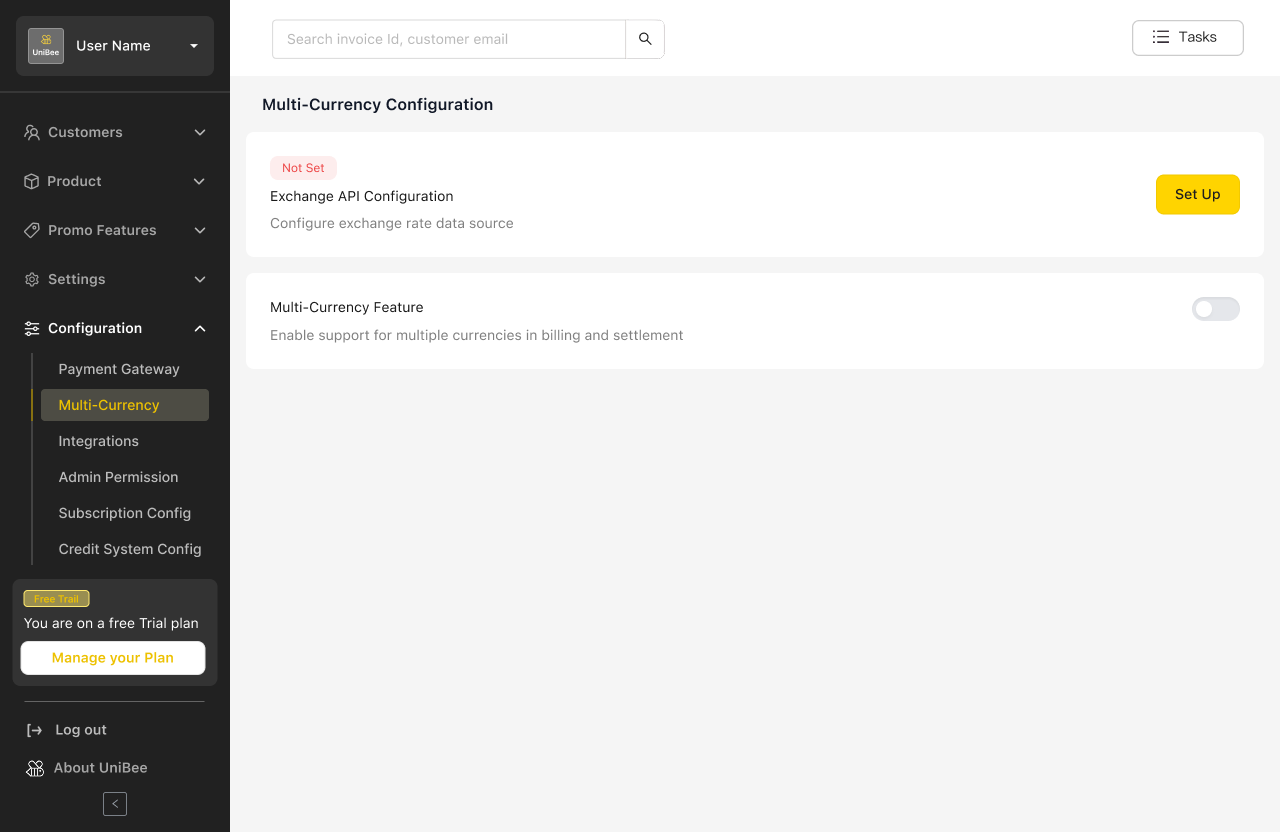
| **Exchange API Configuration** | Integrate external exchange rate APIs (e.g., CurrencyLayer, OpenExchangeRates). Input the API Key and enable/disable the feature. |
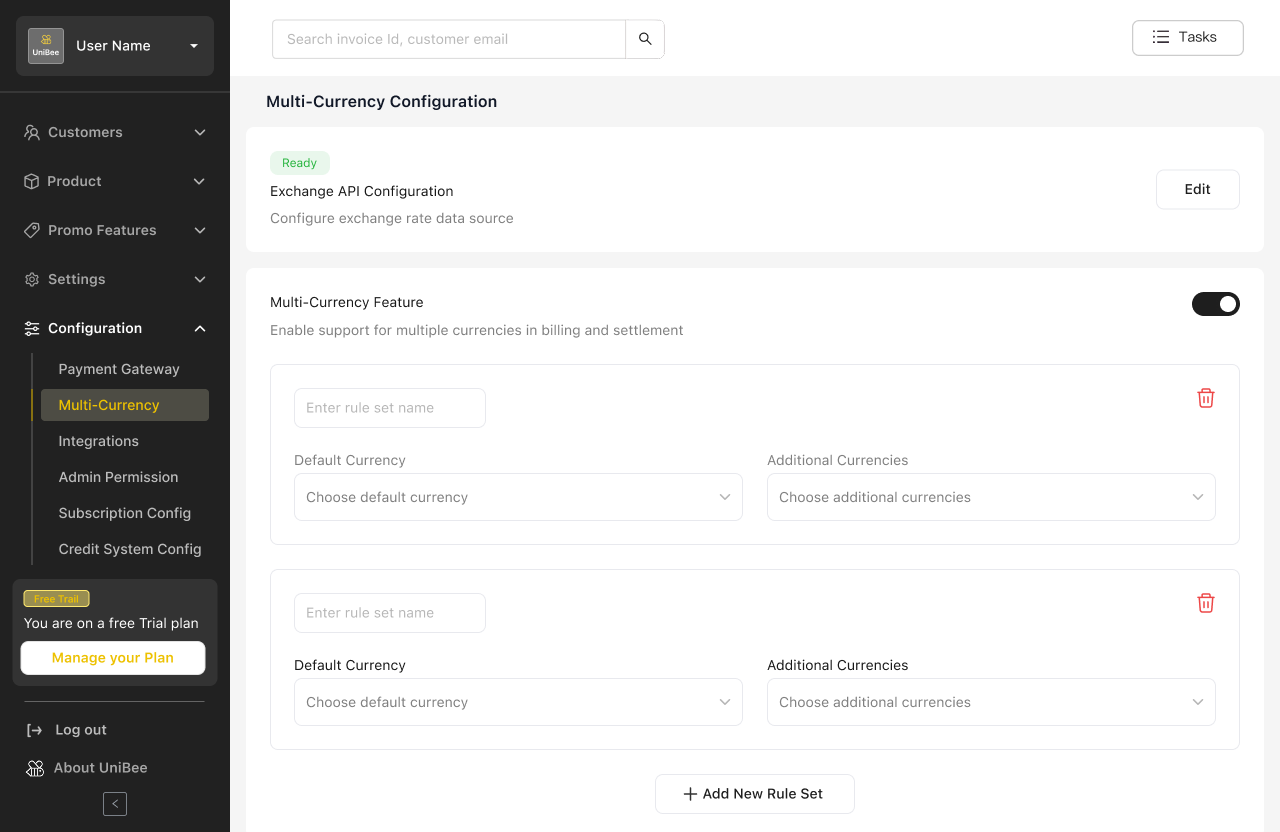
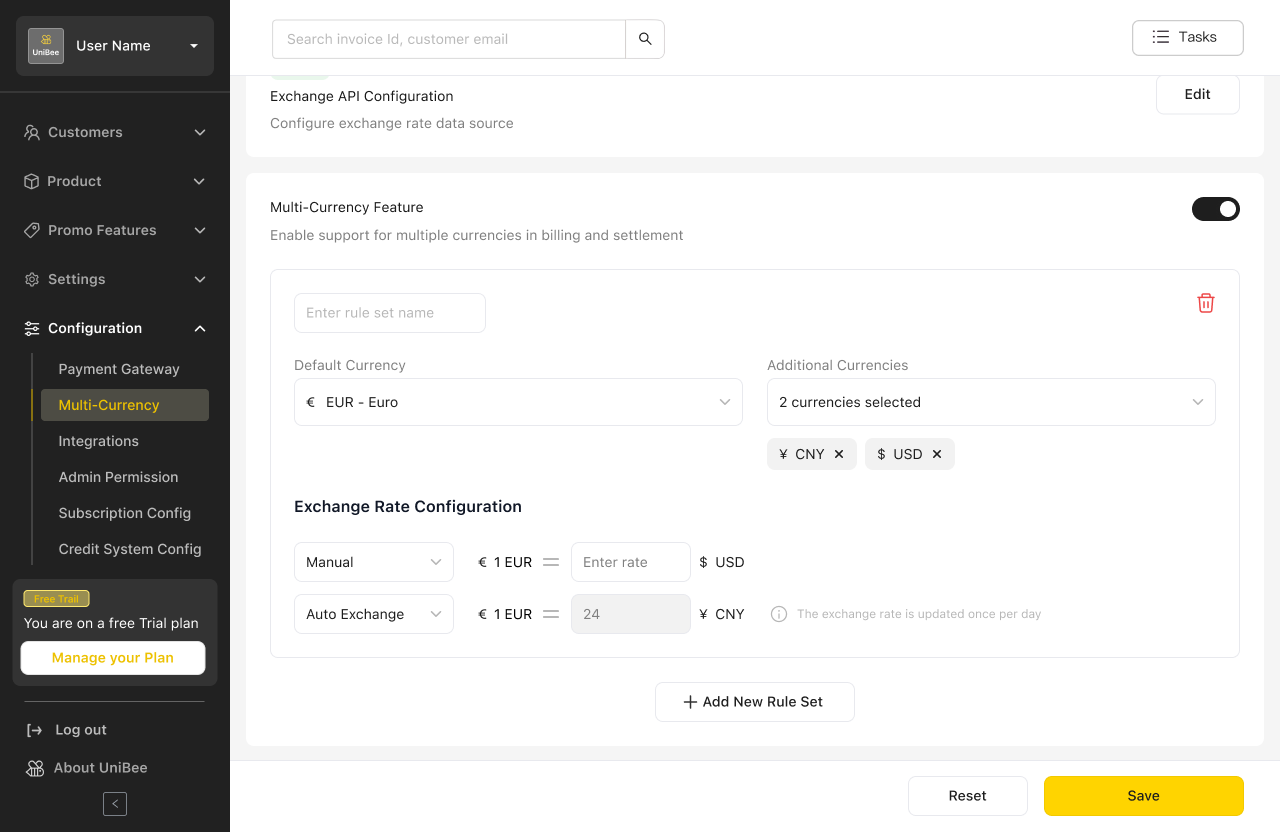
| **Multi-Currency Rule Sets** | Create independent sets of currencies with conversion rules. Each rule set defines one Default Currency and multiple optional currencies. |
| **Exchange Rate Logic** | - If both manual and API rates exist → manual takes priority.
- If API enabled but no manual rates → use API.
- If API disabled → use manual rates only. |
| **Validation** | - Default Currency cannot appear in more than one rule set.
- “Rule Set Name” and “Default Currency” are mandatory fields. |
 ***
## 3️⃣ Plan Setup (Pricing Configuration)
### ⚙️ Logic
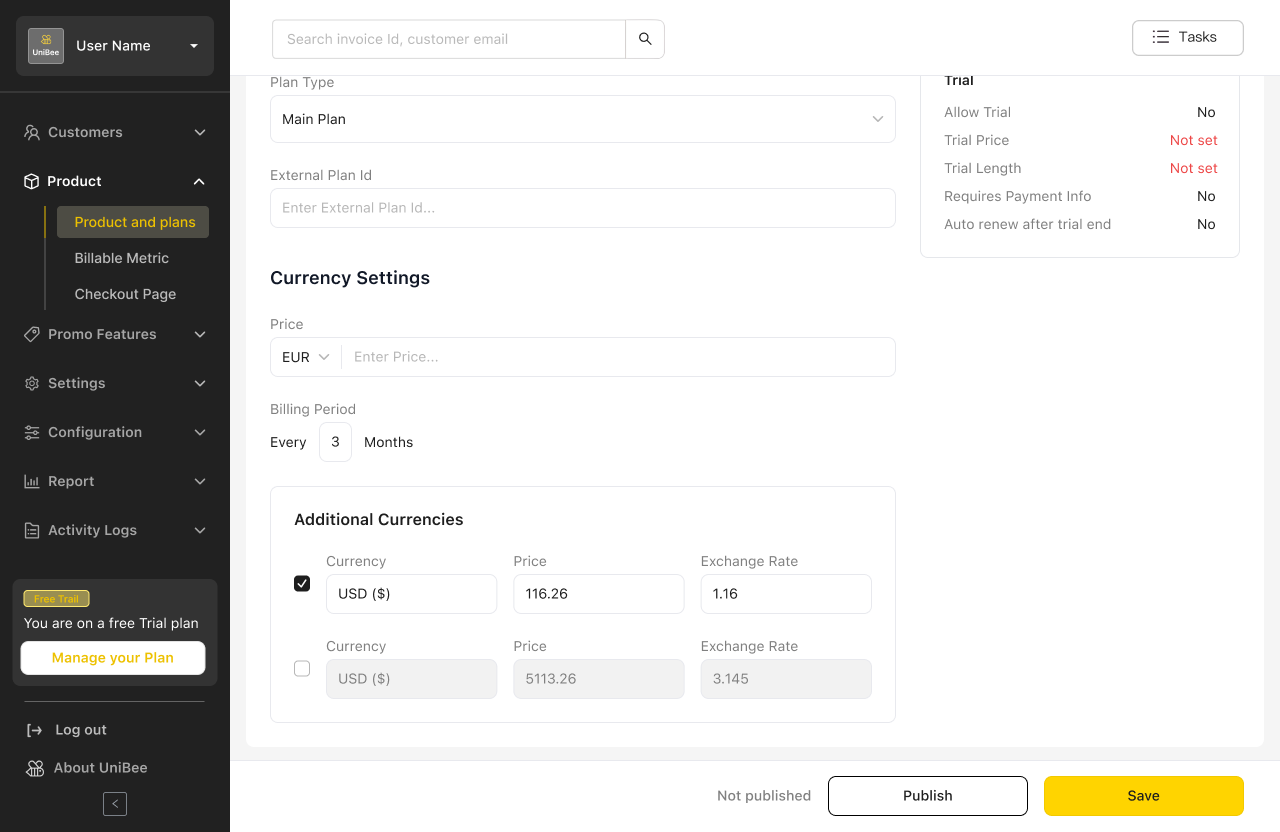
When creating or editing a Plan, the **Default Currency** determines which **Rule Set** applies.\
The system automatically displays converted prices for all currencies defined in the rule set.
### 💡 Key Behaviors
| Step | Action | Description |
| ---- | ---------------------------- | --------------------------------------------------------------------------------------- |
| 1 | Enter Default Currency price | The entered price becomes the base reference. |
| 2 | System auto-converts | Other currencies are calculated based on rule set exchange logic. |
| 3 | Manual override | Users can manually adjust converted prices for flexibility. |
| 4 | Remove currencies | Merchants can remove specific currencies (applies only to this Plan, not the rule set). |
***
## 3️⃣ Plan Setup (Pricing Configuration)
### ⚙️ Logic
When creating or editing a Plan, the **Default Currency** determines which **Rule Set** applies.\
The system automatically displays converted prices for all currencies defined in the rule set.
### 💡 Key Behaviors
| Step | Action | Description |
| ---- | ---------------------------- | --------------------------------------------------------------------------------------- |
| 1 | Enter Default Currency price | The entered price becomes the base reference. |
| 2 | System auto-converts | Other currencies are calculated based on rule set exchange logic. |
| 3 | Manual override | Users can manually adjust converted prices for flexibility. |
| 4 | Remove currencies | Merchants can remove specific currencies (applies only to this Plan, not the rule set). |
 ***
## 4️⃣ Usage-Based Billing (Advanced)
### ⚙️ Behavior
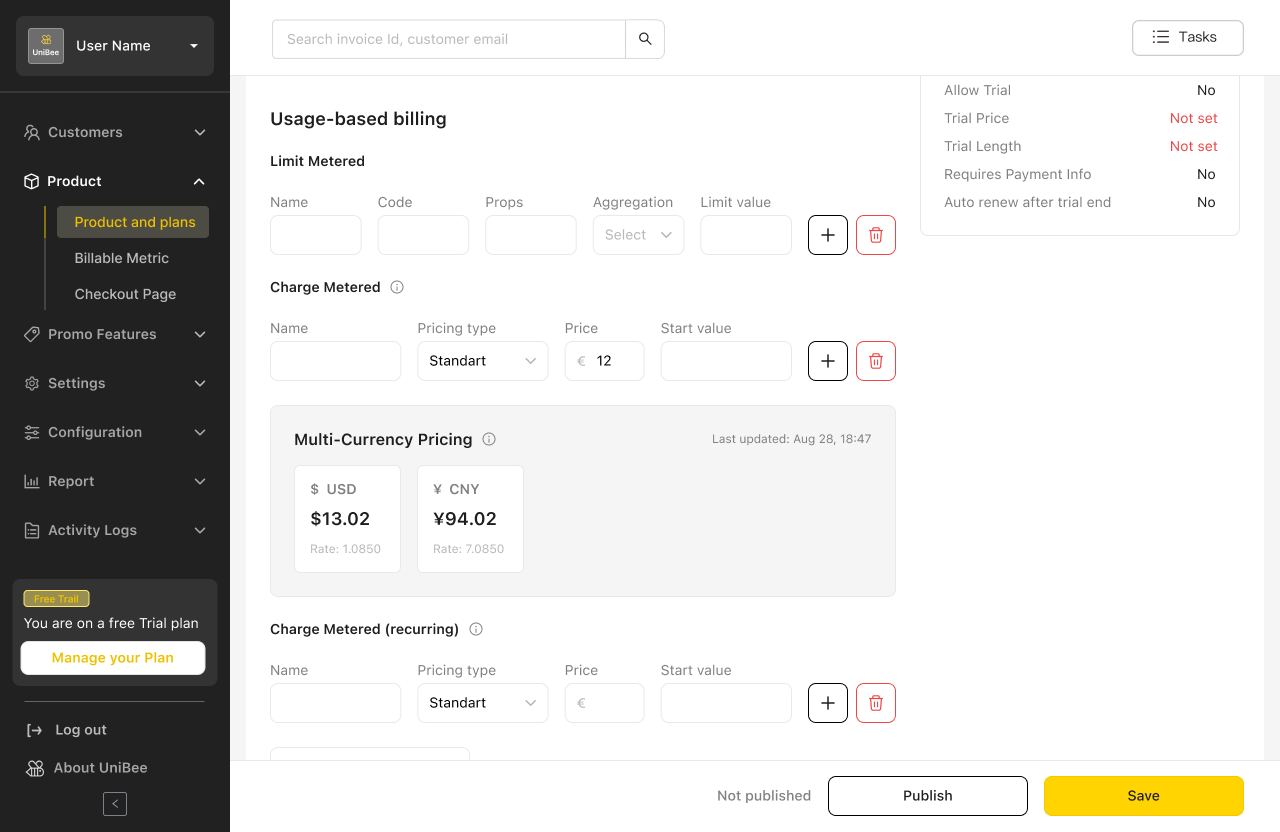
For usage-based pricing models, the system auto-displays the converted prices of each additional currency derived from the rule set.
* **Default Currency:** editable input
* **Additional Currencies:** read-only, auto-converted based on exchange logic
> ✏️ No manual editing is allowed here — ensures billing accuracy across metrics.
***
## 4️⃣ Usage-Based Billing (Advanced)
### ⚙️ Behavior
For usage-based pricing models, the system auto-displays the converted prices of each additional currency derived from the rule set.
* **Default Currency:** editable input
* **Additional Currencies:** read-only, auto-converted based on exchange logic
> ✏️ No manual editing is allowed here — ensures billing accuracy across metrics.
 ***
## 5️⃣ Discount Codes Module
### 💰 Fixed-Amount Discount Conversion
When creating fixed-amount discount codes:
* Input a value in the Default Currency
* The system auto-displays equivalent amounts in other currencies
* Conversion follows the same exchange rate priority logic
**Example:**
> Default Currency = EUR → €10 discount → automatically displays USD, GBP, CNY equivalents.
***
## 5️⃣ Discount Codes Module
### 💰 Fixed-Amount Discount Conversion
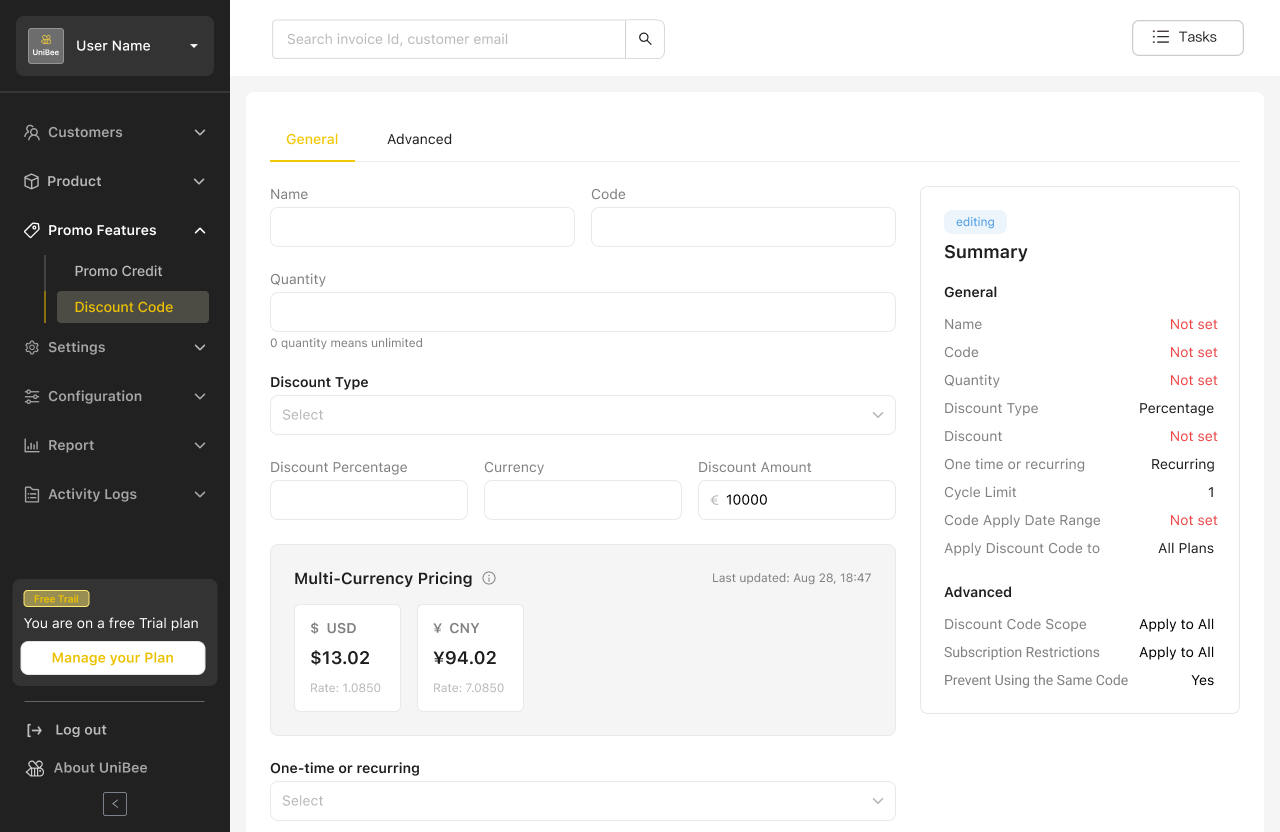
When creating fixed-amount discount codes:
* Input a value in the Default Currency
* The system auto-displays equivalent amounts in other currencies
* Conversion follows the same exchange rate priority logic
**Example:**
> Default Currency = EUR → €10 discount → automatically displays USD, GBP, CNY equivalents.
 ***
## 6️⃣ Exchange Logic Summary
| Condition | Logic Applied |
| -------------------------- | --------------------------------------------------------------------------------------------- |
| API + Manual | Manual rates take priority |
| API only | Use API rates |
| API disabled | Use manual rates only |
| Missing Default Currency | Block save and show error |
| Duplicate Default Currency | Show error: *“Default Currency already exists in another rule set and cannot be duplicated.”* |
***
## 7️⃣ Example Scenarios
| Use Case | Description |
| ----------------------------- | ------------------------------------------------------------------------ |
| **Global SaaS** | One rule set per region (EU, US, APAC) with different default currencies |
| **Custom Enterprise Pricing** | Manually override converted prices for negotiated enterprise plans |
| **Multi-gateway Routing** | Combine with payment gateway routing for full regional flexibility |
***
## 8️⃣ Summary of Benefits
✅ Centralized and flexible global currency management\
✅ Seamless integration with existing billing, metric, and discount systems\
✅ Accurate exchange rates with manual override flexibility\
✅ Reduced operational overhead for international pricing setup
***
## 9️⃣ Recommended Image Order
| # | Image Description | Suggested Placement |
| - | ------------------------------------------- | ------------------- |
| 1 | Multi-Currency Configuration Page | Section 2 |
| 2 | Plan Setup (multi-currency pricing table) | Section 3 |
| 3 | Usage-Based Billing conversion table | Section 4 |
| 4 | Discount Code with currency conversion | Section 5 |
| 5 | Validation error popup (duplicate currency) | Section 6 |
***
## 6️⃣ Exchange Logic Summary
| Condition | Logic Applied |
| -------------------------- | --------------------------------------------------------------------------------------------- |
| API + Manual | Manual rates take priority |
| API only | Use API rates |
| API disabled | Use manual rates only |
| Missing Default Currency | Block save and show error |
| Duplicate Default Currency | Show error: *“Default Currency already exists in another rule set and cannot be duplicated.”* |
***
## 7️⃣ Example Scenarios
| Use Case | Description |
| ----------------------------- | ------------------------------------------------------------------------ |
| **Global SaaS** | One rule set per region (EU, US, APAC) with different default currencies |
| **Custom Enterprise Pricing** | Manually override converted prices for negotiated enterprise plans |
| **Multi-gateway Routing** | Combine with payment gateway routing for full regional flexibility |
***
## 8️⃣ Summary of Benefits
✅ Centralized and flexible global currency management\
✅ Seamless integration with existing billing, metric, and discount systems\
✅ Accurate exchange rates with manual override flexibility\
✅ Reduced operational overhead for international pricing setup
***
## 9️⃣ Recommended Image Order
| # | Image Description | Suggested Placement |
| - | ------------------------------------------- | ------------------- |
| 1 | Multi-Currency Configuration Page | Section 2 |
| 2 | Plan Setup (multi-currency pricing table) | Section 3 |
| 3 | Usage-Based Billing conversion table | Section 4 |
| 4 | Discount Code with currency conversion | Section 5 |
| 5 | Validation error popup (duplicate currency) | Section 6 |