> ## Documentation Index
> Fetch the complete documentation index at: https://docs.unibee.dev/llms.txt
> Use this file to discover all available pages before exploring further.
# Simulate Subscriptions (Sandbox)
> Learn how to simulate subscriptions in a sandbox.
Simulating a subscription shows you the events of a subscription, such as invoices and renewals, that are expected over the course of the simulation time.
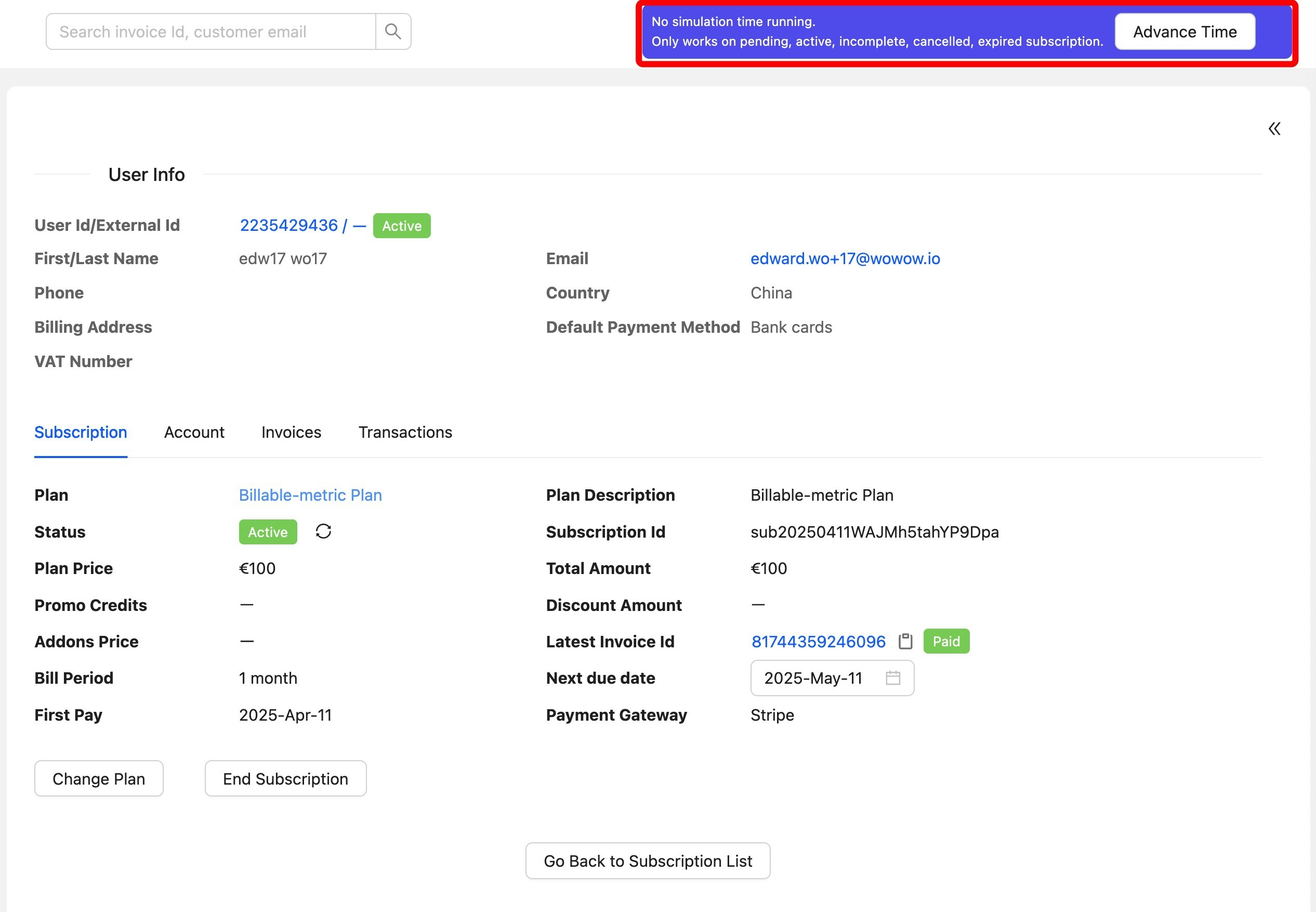
Simulate Subscription only available at sandbox env, when you run a simulation on a subscription, it appears in the AdvanceTime button of the Subscriptions detail page. You can run it by clicking AdvanceTime button then Choosing a simulation time.\
Any subscription will not running in real time mode after you choose to simulate it.
To simulate a subscription:
* Open the Sandbox Admin Portal
* In the subscription detail page, click the `AdvanceTime` button
* In the modal, set the date and time to simulate and click ok
You can advance time by any increment, but you can only advance them two intervals at a time from the initial frozen time. For example, if you have a monthly subscription, you can only advance the clock up to two months at a time.
When the clock is done advancing, the banner updates and displays the clock’s current time.
You can continue to make changes to your simulation and advance the time for simulations