> ## Documentation Index
> Fetch the complete documentation index at: https://docs.unibee.dev/llms.txt
> Use this file to discover all available pages before exploring further.
# Customer experience
# Customer Experience
This page explains what customers see during checkout and after purchase when a plan uses multiple phases.
## Checkout experience
During checkout, customers can review the configured phases in the order they will experience them. This helps customers understand what they will be charged and when.
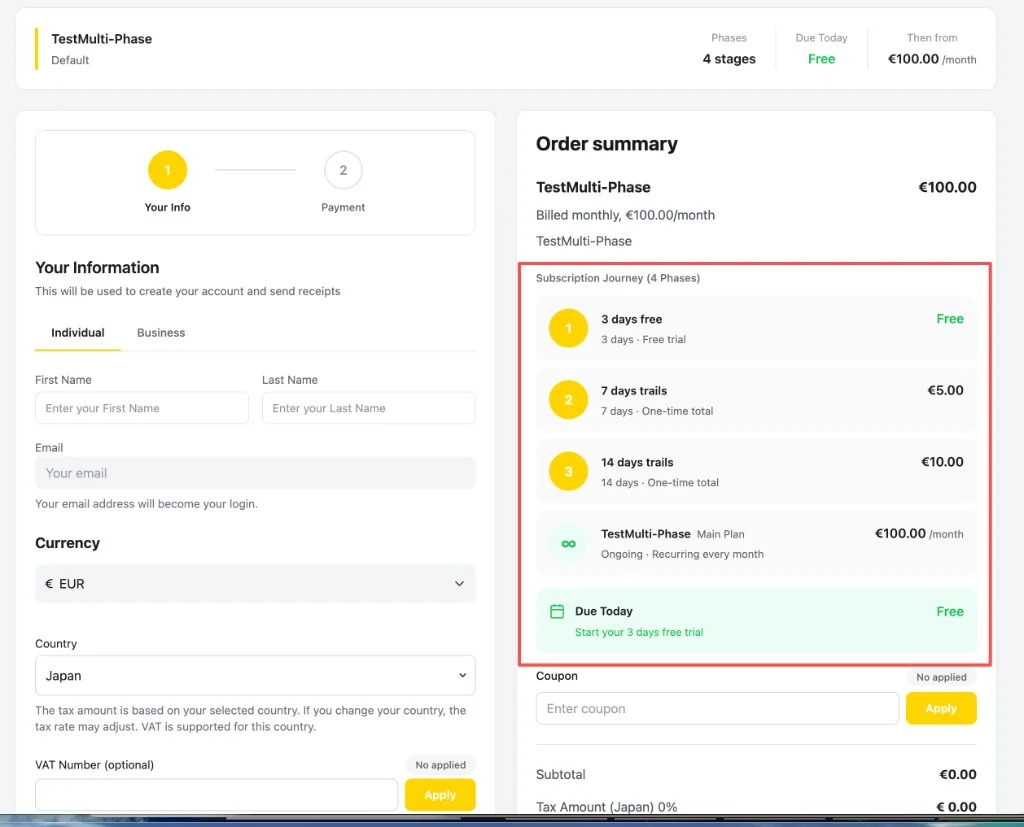 The **Order summary** shows a **Subscription Journey** section that lists every phase in order. Each entry shows the phase name, duration, billing type (free trial, one-time total, or recurring), and price. A header summarizes the number of phases, the amount due today, and the recurring price the customer moves to afterward.
What customers see during checkout:
* The sequence of subscription phases.
* The price of each phase.
* The duration of each phase.
* The transition from the initial phase to the main recurring plan.
## Subscription Details after purchase
After purchase, customers can open the **Subscription Details** page to understand where they are in the subscription lifecycle and what comes next.
The page shows the current phase, such as **Phase 1: 3 days free**, along with **Subscription Phase 1 of 4**. Customers can click **View All** to open the full **Subscription Phases** timeline.
The **Order summary** shows a **Subscription Journey** section that lists every phase in order. Each entry shows the phase name, duration, billing type (free trial, one-time total, or recurring), and price. A header summarizes the number of phases, the amount due today, and the recurring price the customer moves to afterward.
What customers see during checkout:
* The sequence of subscription phases.
* The price of each phase.
* The duration of each phase.
* The transition from the initial phase to the main recurring plan.
## Subscription Details after purchase
After purchase, customers can open the **Subscription Details** page to understand where they are in the subscription lifecycle and what comes next.
The page shows the current phase, such as **Phase 1: 3 days free**, along with **Subscription Phase 1 of 4**. Customers can click **View All** to open the full **Subscription Phases** timeline.
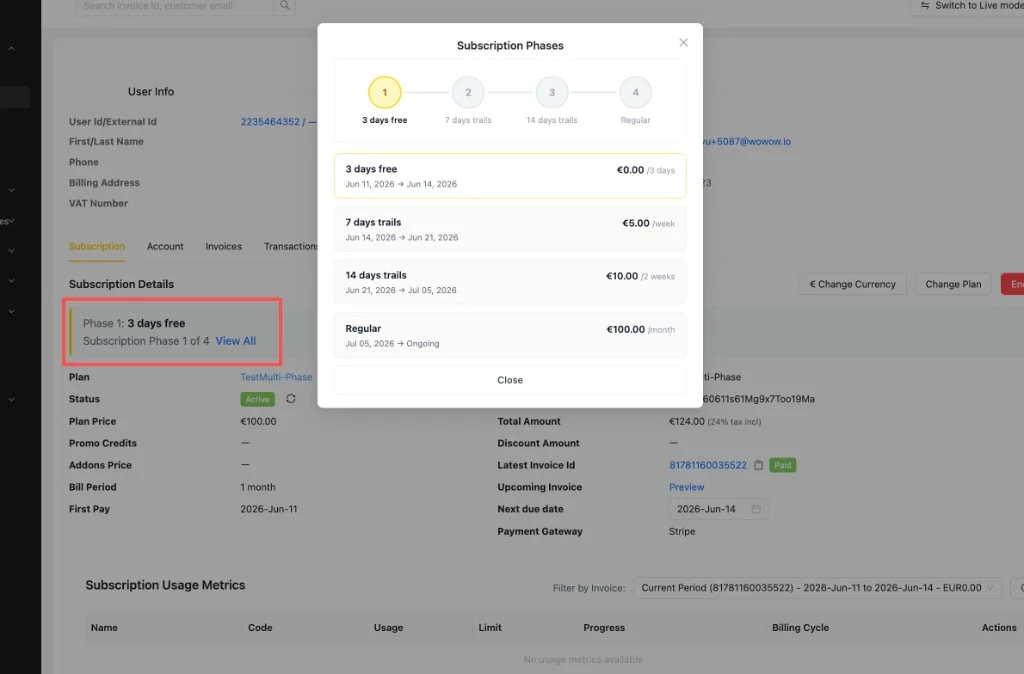 The **Subscription Phases** modal lists every phase in order. The active phase is highlighted, and each entry shows the phase name, date range, and price. The final phase shows the ongoing main plan price.
What customers see after purchase:
* The current subscription phase.
* Upcoming phases.
* Pricing for each stage.
* The full phase timeline when the detailed timeline view is available.
## Why this matters
| Benefit | Description |
| ------------------------ | --------------------------------------------------------------------------------------------------- |
| Clear pricing visibility | Customers can understand the full pricing journey before they pay. |
| Fewer support questions | Merchant teams can point customers to the same timeline shown in checkout and subscription details. |
| Better onboarding | Merchants can combine trials, discounts, and standard pricing in one structured journey. |
## Related pages
* [Understanding Multi-Phase Subscriptions](/documentation/multi-phase/understanding-multi-phase-subscriptions)
* [Creating Multi-Phase Plans](/documentation/multi-phase/creating-multi-phase-plans)
The **Subscription Phases** modal lists every phase in order. The active phase is highlighted, and each entry shows the phase name, date range, and price. The final phase shows the ongoing main plan price.
What customers see after purchase:
* The current subscription phase.
* Upcoming phases.
* Pricing for each stage.
* The full phase timeline when the detailed timeline view is available.
## Why this matters
| Benefit | Description |
| ------------------------ | --------------------------------------------------------------------------------------------------- |
| Clear pricing visibility | Customers can understand the full pricing journey before they pay. |
| Fewer support questions | Merchant teams can point customers to the same timeline shown in checkout and subscription details. |
| Better onboarding | Merchants can combine trials, discounts, and standard pricing in one structured journey. |
## Related pages
* [Understanding Multi-Phase Subscriptions](/documentation/multi-phase/understanding-multi-phase-subscriptions)
* [Creating Multi-Phase Plans](/documentation/multi-phase/creating-multi-phase-plans)