> ## Documentation Index
> Fetch the complete documentation index at: https://docs.unibee.dev/llms.txt
> Use this file to discover all available pages before exploring further.
# How to Sync UniBee Plans to an External Pricing Catalog
> Use the Plan List API, Plan Tags, external plan IDs, and multi-currency prices to power an external pricing page or product catalog
This guide explains how to use UniBee as the source of truth for pricing displayed by an external website, application, or product catalog.
A typical integration looks like this:
```text theme={null}
UniBee -> Your backend or integration service -> Cached pricing data -> Website or application
```
Your backend retrieves plans from UniBee, transforms them into the format required by your application, and publishes a cached or static pricing snapshot. The website should read that snapshot instead of calling the UniBee Merchant API directly.
## Before you begin
You need:
* A UniBee Merchant API key
* Active plans configured in UniBee
* A backend service or scheduled job that can call the UniBee API
* A strategy for deciding which plans should appear in each external catalog
Never expose your UniBee API key in browser-side code. Call the Merchant API from your backend or integration service.
## 1. Define which plans to synchronize
Use plan status and publication status as the minimum filters:
* `status: [2]` selects Active plans.
* `publishStatus: 2` selects Published plans.
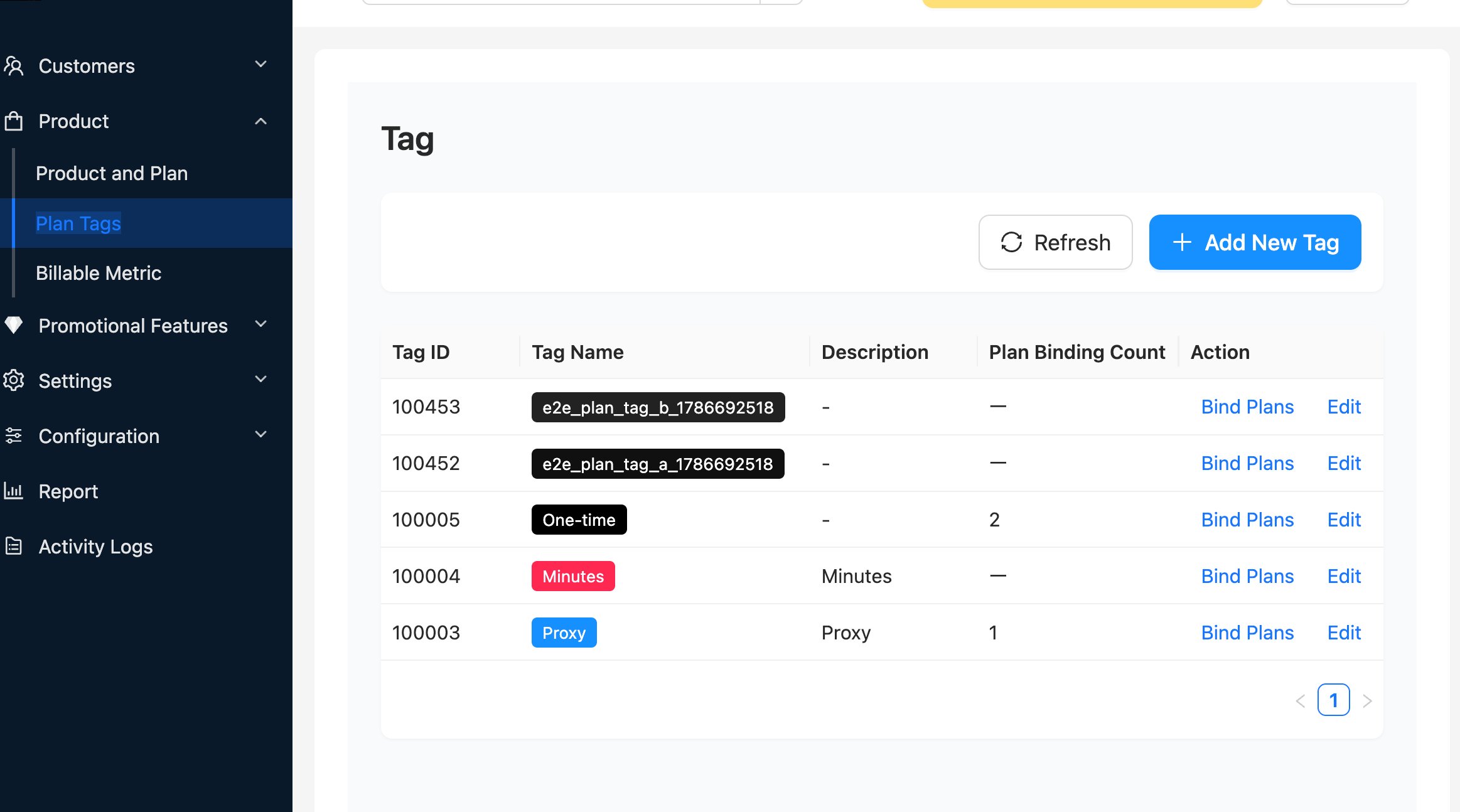
For more precise catalog management, use **Plan Tags**. For example, assign a `pricing-page` tag to every plan that should appear on your public pricing page, and filter the Plan List API by that tag.
Plan Tags are best used for selection and grouping. You can define separate tags for different catalogs, regions, brands, or channels.
Examples include:
* `pricing-page`
* `mobile-app`
* `enterprise-catalog`
* `region-us`
In the UniBee Admin Portal, go to **Product > Plan Tags**. Select **Add New Tag** to create a tag, then use **Bind Plans** to assign it to the plans that belong in the catalog. You can update these assignments without changing your integration code.
 ## 2. Assign stable external IDs
Set `externalPlanId` on every synchronized plan. This value should be unique and stable in your external system.
Use `externalPlanId` to map a UniBee plan to a product or price record in your backend. Do not use the plan name as the mapping key because names are display content and may change.
Plan Tags and `externalPlanId` serve different purposes:
| Field | Purpose |
| ---------------- | ------------------------------------------------------- |
| Plan Tags | Decide which plans belong to a catalog or group |
| `externalPlanId` | Identify the corresponding plan in your external system |
Both can be maintained in the UniBee Admin Portal and can be used together.
## 3. Retrieve plans with the Plan List API
Use the [Get Plan List API](/api-reference/plan/get-plan-list-1) from your backend.
The following example retrieves Active and Published plans that match a specific Plan Tag:
```bash theme={null}
curl -X POST "https://api.unibee.dev/merchant/plan/list" \
-H "Authorization: Bearer $UNIBEE_API_KEY" \
-H "Content-Type: application/json" \
-d '{
"status": [2],
"publishStatus": 2,
"planTagFilter": {
"tagIds": [123],
"mode": "any"
},
"sortField": "gmt_create",
"sortType": "asc",
"page": 0,
"count": 100
}'
```
Replace `123` with the ID of your Plan Tag.
The tag matching modes are:
* `any`: Return plans that have at least one of the supplied tags.
* `all`: Return only plans that have every supplied tag.
If `planIds` and `planTagFilter` are both supplied, UniBee combines them using union (OR) semantics. Omit `planIds` when the result should be controlled only by tags.
You can apply additional filters such as `productIds`, `type`, `currency`, `intervalUnits`, or `intervalCounts` when a catalog has more specific requirements.
## 4. Read every page
The Plan List API is paginated. The first page is `0`, and the default page size is `100`.
Continue requesting pages until all records reported by `data.total` have been retrieved. Do not assume that one response contains the complete catalog.
```javascript theme={null}
const count = 100;
let page = 0;
let plans = [];
let total = 0;
do {
const response = await fetch(`${UNIBEE_API_HOST}/merchant/plan/list`, {
method: "POST",
headers: {
Authorization: `Bearer ${UNIBEE_API_KEY}`,
"Content-Type": "application/json",
},
body: JSON.stringify({
status: [2],
publishStatus: 2,
planTagFilter: { tagIds: [123], mode: "any" },
sortField: "gmt_create",
sortType: "asc",
page,
count,
}),
});
if (!response.ok) throw new Error(`UniBee returned HTTP ${response.status}`);
const result = await response.json();
if (result.code !== 0) throw new Error(result.message || "UniBee API error");
plans.push(...result.data.plans.map((item) => item.plan));
total = result.data.total;
page += 1;
} while (plans.length < total);
```
For a stable snapshot, use the same filters and sorting on every page. If plans may be edited while a large synchronization is running, schedule a second synchronization after the first one completes.
## 5. Resolve prices in the required currency
Each item in `data.plans` is a plan detail object. The plan itself is available in `item.plan`. It has a default price in `amount` and `currency`, while additional configured currencies are returned in `multiCurrencies`.
To resolve a price for a target currency such as USD:
1. If the top-level `currency` is `USD`, use the top-level `amount`.
2. Otherwise, find the enabled USD entry in `multiCurrencies` and use its `amount`.
3. Do not calculate your own exchange rate. Use the amount returned by UniBee.
```javascript theme={null}
function getPlanPrice(plan, targetCurrency) {
const currency = targetCurrency.toUpperCase();
if (plan.currency?.toUpperCase() === currency) {
return plan.amount;
}
const alternative = plan.multiCurrencies?.find(
(item) => item.currency?.toUpperCase() === currency && !item.disable,
);
return alternative?.amount ?? null;
}
```
All amounts are returned in minor currency units. For example, `9900` means USD 99.00.
The `currency` request filter selects plans by their default currency. It does not convert every returned plan into that currency. Use `multiCurrencies` when plans in the same catalog have different default currencies.
For more information, see [UniBee Multi-Currencies Module](/documentation/business-integration/multi-currencies-module).
## 6. Build and publish a pricing snapshot
Transform the API response into a small, application-specific structure. Keep UniBee IDs for API operations and `externalPlanId` for external mapping.
```json theme={null}
{
"generatedAt": "2026-08-17T12:00:00Z",
"plans": [
{
"planId": 456,
"externalPlanId": "business-monthly",
"name": "Business",
"description": "For growing teams",
"currency": "USD",
"amount": 9900,
"intervalUnit": "month",
"intervalCount": 1
}
]
}
```
Publish the new snapshot only after every page has been fetched and validated successfully. If synchronization fails, keep serving the last valid snapshot instead of replacing it with partial data.
## 7. Choose a refresh strategy
For a public pricing page, a periodic synchronization is usually sufficient. The appropriate interval depends on how often your catalog changes; common choices range from every few minutes to once per hour.
Recommended safeguards:
* Cache the generated catalog in your backend or CDN.
* Retry temporary API failures with exponential backoff.
* Record the synchronization time and source plan IDs.
* Reject plans that do not have an `externalPlanId` when stable mapping is required.
* Validate that every displayed plan has a usable price in the target currency.
* Replace the published snapshot atomically only after a complete successful run.
## Implementation checklist
* [ ] Merchant API calls run only on the backend.
* [ ] Only Active and Published plans are selected.
* [ ] Plan Tags define catalog membership where needed.
* [ ] Every synchronized plan has a stable `externalPlanId`.
* [ ] All pages are fetched using `data.total`.
* [ ] Prices come from the default currency or `multiCurrencies`.
* [ ] Amounts are converted from minor units only for display.
* [ ] The last valid snapshot remains available if synchronization fails.
## 2. Assign stable external IDs
Set `externalPlanId` on every synchronized plan. This value should be unique and stable in your external system.
Use `externalPlanId` to map a UniBee plan to a product or price record in your backend. Do not use the plan name as the mapping key because names are display content and may change.
Plan Tags and `externalPlanId` serve different purposes:
| Field | Purpose |
| ---------------- | ------------------------------------------------------- |
| Plan Tags | Decide which plans belong to a catalog or group |
| `externalPlanId` | Identify the corresponding plan in your external system |
Both can be maintained in the UniBee Admin Portal and can be used together.
## 3. Retrieve plans with the Plan List API
Use the [Get Plan List API](/api-reference/plan/get-plan-list-1) from your backend.
The following example retrieves Active and Published plans that match a specific Plan Tag:
```bash theme={null}
curl -X POST "https://api.unibee.dev/merchant/plan/list" \
-H "Authorization: Bearer $UNIBEE_API_KEY" \
-H "Content-Type: application/json" \
-d '{
"status": [2],
"publishStatus": 2,
"planTagFilter": {
"tagIds": [123],
"mode": "any"
},
"sortField": "gmt_create",
"sortType": "asc",
"page": 0,
"count": 100
}'
```
Replace `123` with the ID of your Plan Tag.
The tag matching modes are:
* `any`: Return plans that have at least one of the supplied tags.
* `all`: Return only plans that have every supplied tag.
If `planIds` and `planTagFilter` are both supplied, UniBee combines them using union (OR) semantics. Omit `planIds` when the result should be controlled only by tags.
You can apply additional filters such as `productIds`, `type`, `currency`, `intervalUnits`, or `intervalCounts` when a catalog has more specific requirements.
## 4. Read every page
The Plan List API is paginated. The first page is `0`, and the default page size is `100`.
Continue requesting pages until all records reported by `data.total` have been retrieved. Do not assume that one response contains the complete catalog.
```javascript theme={null}
const count = 100;
let page = 0;
let plans = [];
let total = 0;
do {
const response = await fetch(`${UNIBEE_API_HOST}/merchant/plan/list`, {
method: "POST",
headers: {
Authorization: `Bearer ${UNIBEE_API_KEY}`,
"Content-Type": "application/json",
},
body: JSON.stringify({
status: [2],
publishStatus: 2,
planTagFilter: { tagIds: [123], mode: "any" },
sortField: "gmt_create",
sortType: "asc",
page,
count,
}),
});
if (!response.ok) throw new Error(`UniBee returned HTTP ${response.status}`);
const result = await response.json();
if (result.code !== 0) throw new Error(result.message || "UniBee API error");
plans.push(...result.data.plans.map((item) => item.plan));
total = result.data.total;
page += 1;
} while (plans.length < total);
```
For a stable snapshot, use the same filters and sorting on every page. If plans may be edited while a large synchronization is running, schedule a second synchronization after the first one completes.
## 5. Resolve prices in the required currency
Each item in `data.plans` is a plan detail object. The plan itself is available in `item.plan`. It has a default price in `amount` and `currency`, while additional configured currencies are returned in `multiCurrencies`.
To resolve a price for a target currency such as USD:
1. If the top-level `currency` is `USD`, use the top-level `amount`.
2. Otherwise, find the enabled USD entry in `multiCurrencies` and use its `amount`.
3. Do not calculate your own exchange rate. Use the amount returned by UniBee.
```javascript theme={null}
function getPlanPrice(plan, targetCurrency) {
const currency = targetCurrency.toUpperCase();
if (plan.currency?.toUpperCase() === currency) {
return plan.amount;
}
const alternative = plan.multiCurrencies?.find(
(item) => item.currency?.toUpperCase() === currency && !item.disable,
);
return alternative?.amount ?? null;
}
```
All amounts are returned in minor currency units. For example, `9900` means USD 99.00.
The `currency` request filter selects plans by their default currency. It does not convert every returned plan into that currency. Use `multiCurrencies` when plans in the same catalog have different default currencies.
For more information, see [UniBee Multi-Currencies Module](/documentation/business-integration/multi-currencies-module).
## 6. Build and publish a pricing snapshot
Transform the API response into a small, application-specific structure. Keep UniBee IDs for API operations and `externalPlanId` for external mapping.
```json theme={null}
{
"generatedAt": "2026-08-17T12:00:00Z",
"plans": [
{
"planId": 456,
"externalPlanId": "business-monthly",
"name": "Business",
"description": "For growing teams",
"currency": "USD",
"amount": 9900,
"intervalUnit": "month",
"intervalCount": 1
}
]
}
```
Publish the new snapshot only after every page has been fetched and validated successfully. If synchronization fails, keep serving the last valid snapshot instead of replacing it with partial data.
## 7. Choose a refresh strategy
For a public pricing page, a periodic synchronization is usually sufficient. The appropriate interval depends on how often your catalog changes; common choices range from every few minutes to once per hour.
Recommended safeguards:
* Cache the generated catalog in your backend or CDN.
* Retry temporary API failures with exponential backoff.
* Record the synchronization time and source plan IDs.
* Reject plans that do not have an `externalPlanId` when stable mapping is required.
* Validate that every displayed plan has a usable price in the target currency.
* Replace the published snapshot atomically only after a complete successful run.
## Implementation checklist
* [ ] Merchant API calls run only on the backend.
* [ ] Only Active and Published plans are selected.
* [ ] Plan Tags define catalog membership where needed.
* [ ] Every synchronized plan has a stable `externalPlanId`.
* [ ] All pages are fetched using `data.total`.
* [ ] Prices come from the default currency or `multiCurrencies`.
* [ ] Amounts are converted from minor units only for display.
* [ ] The last valid snapshot remains available if synchronization fails.